Designing in parallel (or a designer discovers worktrees)
Originally presented at Vercel Demo Night: Designing with AI (thanks to John Phamous for the invite).
As AI eats software, engineers are drastically changing their workflows — this year, some of my coworkers haven't written a line of code themselves (or, at least, not 'by hand'). Coding agents are lowering the barrier to building anything, which raises the importance of building the right thing since code execution now yields less of a competitive advantage. This puts pressure on design as a new bottleneck, so I'm experimenting with leveraging AI to speed up my workflow as well. In the spirit of learning to love the terminal, my first attempt utilizes multiple coding agents (currently Claude Code) + Git worktrees to augment my design process with two agentic attributes: tirelessness & parallelism.
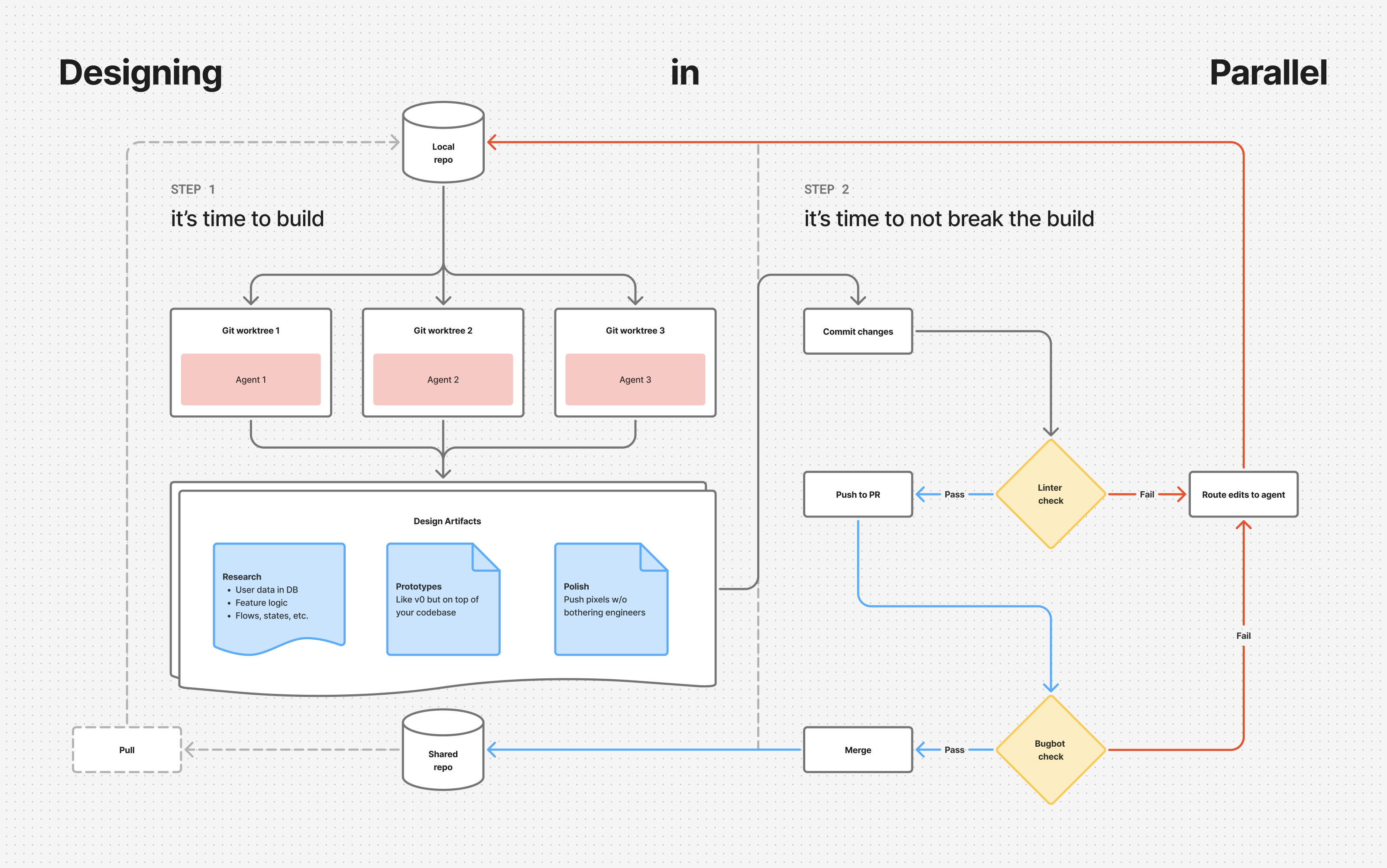
This approach is based on two beliefs…
- Closer to the codebase is better: Code isn't everything, but it's where many necessary steps live. AI agents remove the skill issue for designers to get closer to base. This makes it easier to understand your software's ergonomics, analyze / prototype with real data, & just. ship. it. That said, there are moments with clear justifications for distance: "I can explore this quicker in Figma", "Our current UX is a local maxima", or "I'm going to the museum to think about art instead of APIs".
- Speed compounds: In the past, programmatic workflows suffocated spontaneity, which is a necessary ingredient in the epiphanies leading to the best moments of delight — once automated, the process no longer felt creative. But this was a tool issue due to deterministic systems only accepting static schema as input. Now we have "creative computers" that we can offload the... cognitive load of... offloading rote work. I've been trying to leverage this flexibility to delegate basic steps to parallel agents. Time saved by not doing things makes space to strategize on better things to do next, kickstarting a positive feedback loop. An emergent property is I've found more time to peruse design books.
Setup
Here's an overview of my current workflow, much of which I was lucky to piggyback off preexisting setup by the Yutori engineering team. This gave me a robust infrastructure to learn from, so I'm sharing in hopes that it helps other designers start experimenting. It's still early so there's a good chance I'm currently holding it wrong, thus any feedback, questions, & advice is warmly welcome.
- IDE:
Despite working mostly in terminal these days, I still use Cursor out of habit & because I have a personal subscription which makes it easy to switch off of Yutori's inference bill when working on personal projects after hours.Edit: since writing this, I've switched over to Conductor which beautifully automates items 2-3 below. However, I'm leaving them written as is to provide some technical explanation for what's happening under the hood. - Workspace: I have a
.code-workspaceJSON file housing three git worktrees which I keep persistent to cycle through various branches in parallel. This is against general recommendations, but most of my work is relatively simple from a technical perspective so I cycle branches often. - Multiplexer: Each session starts with a custom command running a tmux script that invokes multiple multi-pane terminal windows with parallel instances of Claude Code in
dangerously-skip-permissionsmode (yeehaw), correspondingpnpm run devcommands to pop open localhost on all utilized ports, Agentation MCP to give in-context feedback to agents, & corresponding backup terminals in case needed. - Prompts: Initial guidance set in CLAUDE.md + complemented by various skills.
- QAQC: Linters on each commit for type errors + Cursor Bugbot on PRs for a final check.
Takeaways
Initial results of designing in parallel are mixed, but lean positive. I foremost enjoy kickstarting feature research by asking agents to compile reports on current component states, dependencies / edge cases to be aware of, & corresponding cohort analysis via our database. This has saved a lot of time manually poking through screens & asking engineers dumb questions (so it also saves me face). I've personally squashed paper cut bugs shortly after users report them by skipping the entire Linear → Figma → spec → handoff process & instead pushing pixels directly in code, all while engineers worry about more complex issues. Lastly, I've really enjoyed prototyping with real data — essentially v0 on top of our codebase.

The main problem, however, is the current interface. It's near impossible to enter a flow state when constantly checking in on your agents. We're moving faster, but at the cost of context switching more often. This puts us on a manager's schedule, instead of a maker's schedule, which isn't ideal for deep work. The next step is designing a way to bubble up relevant data from all parallel threads into a holistic view that might trade some low-level control for high-level clarity. It feels like a big opportunity for data visualizations on agent trajectories.
If you're a designer currently adapting your process for the AI era, let's chat!